
 Free quiz to know your sales aptitude
 Sales Pipeline Calculator
In many industries, winning a customer is followed by another process: collecting documents.
- A financial advisor may need identification and financial statements.
- An insurance broker may require application forms and supporting evidence.
- A real estate company may need proof of income and identification.
- A consulting firm may need contracts, questionnaires, certificates or company documents before a project can begin.
The problem is that this process often happens outside the CRM. This creates a gap between customer relationship management and the operational work required to move that relationship forward.
File storage is not document collection
Giving customers a shared folder solves one part of the problem: transferring files. It does not necessarily manage the process.
Consider a company that needs five documents from a new customer.
With a shared folder, the customer can upload files. But someone still has to
- determine whether all five were received
- identify which file corresponds to which requirement
- check deadlines
- follow up on missing items and communicate when something needs to be submitted again
A structured document request works differently.
Instead of saying:
“Please upload your documents here.”
the business can say:
We need these five specific documents, each with its own instructions and due date.
Each document then becomes a trackable item with its own status.
That is the idea behind Document Requests in the Onpipeline Customer Portal.
Bringing document requests into the CRM
Onpipeline allows businesses to create Document Requests linked directly to a Person, Organization or Deal.
A request can include:
- a document name;
- instructions for the customer;
- a due date;
- an assigned reviewer;
- and an optional sample file showing what is expected.
- The customer sees the request in a branded Customer Portal and uploads the required document.
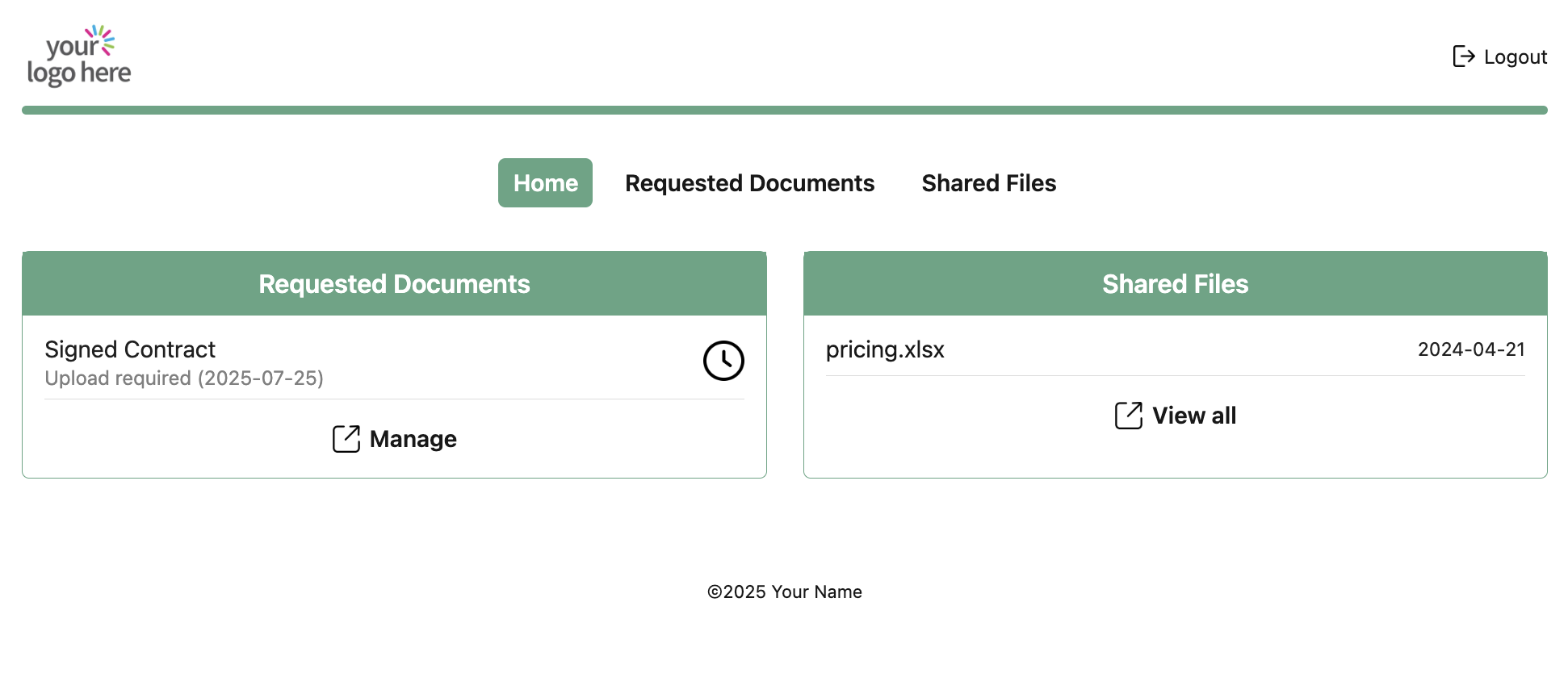
Once submitted, the document becomes available for review inside Onpipeline.
The reviewer can approve it or reject it with a reason. If rejected, the customer can upload a corrected version. Instead of having information scattered across emails and folders, the document remains connected to the CRM record that created the requirement.
Where this matters most
The need exists in many businesses, but some industries experience the problem constantly.
Financial services
Financial advisors, lenders, brokers and other financial service providers often need identity documents, bank statements, tax documents, proof of address and other supporting material.
The challenge is rarely storing the files. The challenge is knowing what is still missing for each customer.
Document Requests provide a structured checklist connected to the customer or Deal.
Insurance
Insurance processes can require applications, identity documents, certificates, photographs, declarations and supporting evidence.
Different products may also require different documentation.
Connecting document requests to Deal automation means that the required documents can depend on the type of opportunity being processed.
Real estate
Property transactions frequently involve identification, proof of income, financial documentation, agreements and other supporting files.
With multiple customers and transactions progressing simultaneously, email-based collection can quickly become difficult to track.
A CRM-connected workflow keeps the documentation associated with the relevant Person, Organization or Deal.
Professional and consulting services
Consultants, agencies and other professional service firms often need documents before onboarding or starting a project: signed agreements, questionnaires, brand assets, technical files, company information or certifications.
Document requests can become part of the handover between sales and delivery instead of a separate manual process.
Accounting, compliance and business services
Businesses that repeatedly request certificates, financial records, corporate documentation or compliance information face the same problem at a larger scale.
Reusable request templates can make these recurring processes much easier to standardize.
A practical example: onboarding a new financial services customer
Imagine a financial services company has just won a new Deal.
Before onboarding can be completed, it needs:
- Proof of identity
- Proof of address
- Latest bank statement
- Tax documentation
- Signed customer declaration
Without an integrated process, a team member might send an email listing the five requirements.
Two days later, the customer sends three attachments.
The employee now has to determine which three requirements have been satisfied, record the missing documents somewhere, send another email, and perhaps involve another colleague to review what has already arrived.
Now consider the same process using Onpipeline.
When the Deal is marked as Won, Onpipeline can automatically create the predefined set of five Document Requests.
The customer receives access to the portal and sees exactly what is required.
Each request can contain its own instructions and due date.
If the customer uploads four documents, the fifth remains clearly outstanding.
If the bank statement is not acceptable, the reviewer rejects that specific request and provides a reason. The customer sees what needs to be corrected and can submit another file.
Automatic reminders can continue for outstanding requests without requiring the account manager to manually follow up.
The CRM now has a clear view of both sides of the process:
the commercial relationship and the documents required to progress it.
Collection can also follow the Deal
One of the more useful aspects of connecting document management to a CRM is that requests do not always have to be created manually.
In Onpipeline, predefined sets of Document Requests can be triggered when a Deal reaches a particular Pipeline Stage or when it is marked as Won.
Conditions can further determine when those requests should be created.
For example, a company could request:
- one set of documents for individual customers;
- another set for corporate customers;
- additional documentation for a particular product;
- or specific files only when a custom Deal field meets a certain condition.
The document workflow therefore follows the same business rules already represented by the CRM.
A better customer experience
The benefit is not only internal. Customers no longer need to search old email threads to understand what is still required. The Customer Portal gives them a single place where they can access their requests, upload documents, view shared files and access available invoices.
- For the customer, the process becomes clearer.
- For the business, it becomes measurable and repeatable.
From document exchange to workflow
Most companies do not have a file storage problem.
They have a document coordination problem.
They need to know what was requested, what has arrived, what is still missing, who needs to review it and what must happen next. When those steps are managed separately from the CRM, teams lose context and spend more time coordinating information.
By connecting Document Requests, customer uploads, reviews, reminders and Deal automation, Onpipeline turns document collection from an informal exchange of files into a structured part of the customer relationship.