
What is CRM?
A Complete Guide to Customer Relationship Management
CRM stands for Customer Relationship Management. It refers to both the strategy and the technology businesses use to manage interactions with customers, prospects, and partners throughout the customer lifecycle.
At its core, CRM is about building stronger relationships. Companies use a CRM software to organize customer information, track conversations, manage sales opportunities, automate processes, and improve collaboration between teams.
Without a CRM, customer data often becomes scattered across spreadsheets, emails, notes, and disconnected applications. This makes it difficult to understand the full customer journey and provide a consistent experience.
Modern CRM software centralizes customer information and creates a single source of truth for sales, marketing, customer service, and management teams.
If you’re unfamiliar with CRM terminology, our CRM glossary explains the most common concepts and definitions used in customer relationship management.
Your customers are like gold for your small business! As you grow, you’ll want a special place where your sales team can find all the info about customers and take care of relationships. That’s where these systems come in.
Why CRM Matters for Modern Businesses
Customer relationships are one of the most valuable assets any business owns. As organizations grow, managing those relationships manually becomes increasingly difficult.
A CRM helps businesses keep track of every interaction, opportunity, and activity in one place. Instead of relying on memory, spreadsheets, or disconnected tools, teams can access accurate customer information whenever they need it.
CRM systems help organizations:
- Improve customer visibility
- Increase sales productivity
- Strengthen customer relationships
- Improve reporting and forecasting
- Automate repetitive processes
- Support long-term growth
CRM platforms also play a critical role in improving customer retention with CRM, helping businesses maintain relationships after the initial sale and create more opportunities for repeat business.
Accurate CRM data also supports quote management, invoicing, workflow automation, and sales forecasting, giving businesses better visibility into their pipeline and helping managers make more informed decisions about growth, hiring, and resource allocation.
CRM
More contacts within a company
Contact history
Sales pipeline
Reporting
and much more!
Excel
E-mail
Phone
Website
Street address
Customer type
How CRM Software Works
A CRM acts as a central hub for customer information and business activity. Every interaction is recorded and connected to a customer record, making it easy for teams to understand previous conversations, ongoing opportunities, and future actions.
Most CRM systems include:
- Contact management
- Company management
- Opportunity tracking
- Task management
- Email tracking
- Notes and activity history
- Reporting dashboards
- Workflow automation
Rather than managing information in separate tools, CRM software connects customer records with active deals, communication history, and sales activities.
For sales teams, one of the most important CRM capabilities is sales pipeline management. CRM software makes it easier to track opportunities through every stage of the sales process and maintain visibility into future revenue.
Many organizations also use dedicated deal management tools within their CRM to organize opportunities, prioritize activities, and improve conversion rates.
For larger teams, CRM databases become increasingly valuable because they create a structured repository of customer information. Well-organized CRM databases for sales help businesses scale without losing visibility into customer relationships.
CRM vs Spreadsheets
Many businesses begin by managing customer information in spreadsheets. While spreadsheets can be effective for small teams with a limited number of contacts, they become increasingly difficult to manage as operations grow.
Spreadsheets require manual updates, provide limited visibility, and create challenges when multiple team members need access to the same information.
As the number of contacts, opportunities, and customer interactions increases, businesses often struggle to maintain accurate records and consistent processes.
A CRM is specifically designed to manage relationships, not just store data.
Unlike spreadsheets, CRM software can:
- Track customer interactions automatically
- Manage opportunities visually
- Schedule activities and reminders
- Generate reports and dashboards
- Support forecasting
- Automate repetitive tasks
- Improve team collaboration
If you are comparing solutions, explore the differences between a CRM and a spreadsheet for sales management.
Organizations focused on opportunity tracking may also find it useful to compare sales pipeline spreadsheets vs CRM software before deciding which approach best fits their needs.

Key Benefits
Not all CRM systems offer the same functionality. However, most successful CRM implementations rely on a common set of features.

Contacts
Contact management allows businesses to organize customer information, communication history, notes, and activities in a centralized location.

Sales Pipeline Management
Pipelines help teams track opportunities from first contact to closed deal while maintaining visibility into deal progress and expected revenue.

Reporting and Analytics
CRM reporting helps businesses understand performance, identify trends, and make data-driven decisions. Strong sales reporting capabilities allow managers to monitor activity, conversion rates, and team performance.
Workflow Automation
Modern CRM platforms reduce manual work through CRM workflow automation. Automated workflows can assign leads, create tasks, send notifications, and ensure important activities are never missed.

Centralized Database
Everyone in your company can access the CRM database with all contact information. They can quickly find contacts, view customer profiles, and access needed information.
It gives important customer info, targets the right people, and improves marketing.
Customization and Integrations
The best CRM systems adapt to existing business processes rather than forcing teams to change how they work.
Custom fields, integrations, dashboards, and workflows help businesses create a CRM environment that supports their specific requirements.
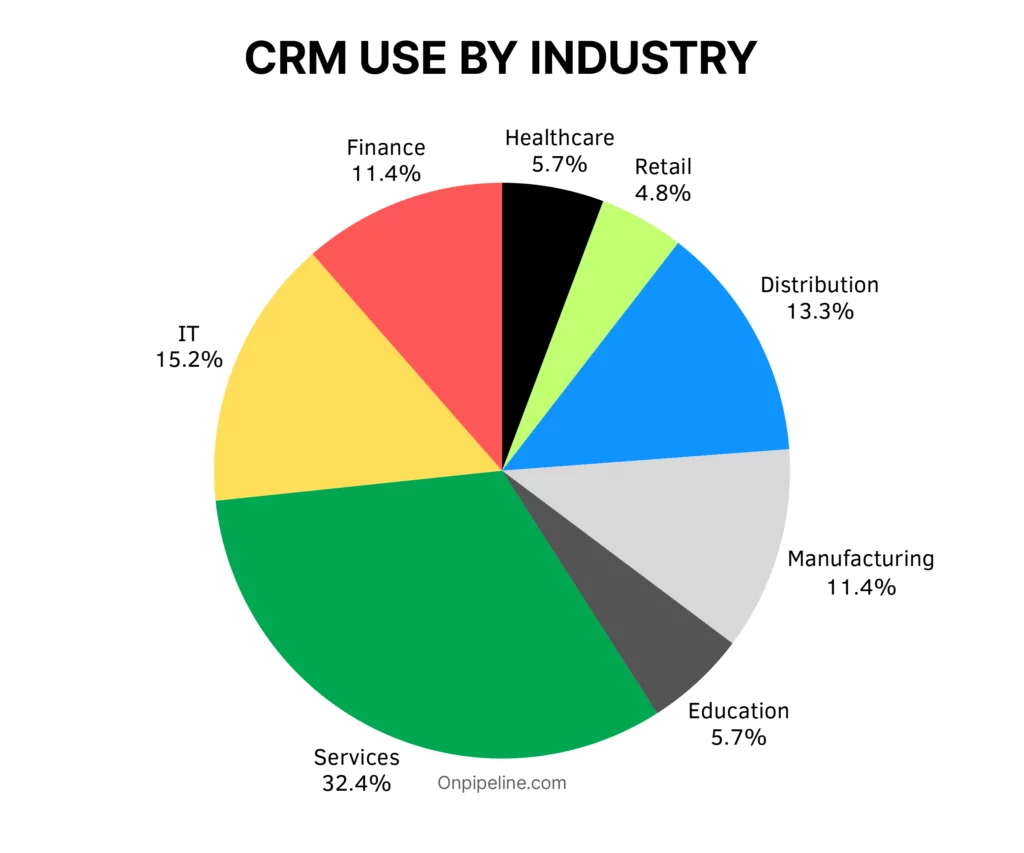
Survey conducted with SMEs across Europe, Latin America and the United States. It offers an indication quite close to reality regarding the current use of CRM software.
Free for 30 days!
No contract and no credit card required. Fully operational account. You can try and confirm the same settings by placing an order, or simply let the trial period expire.
Start todayCloud-based
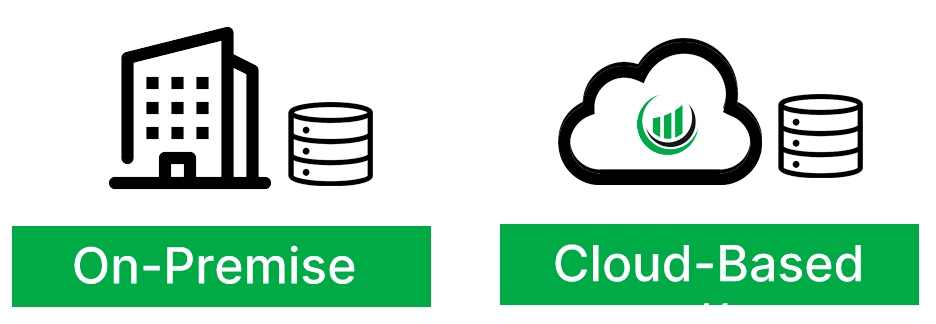
A cloud-based software is a tool or platform that you can use over the internet. Instead of installing the tool on your computer, it runs on powerful computers in data centers. This means you can access and use the service from anywhere, as long as you have an internet connection.
The same information to anyone from anywhere
Onpipeline offers a cloud-based system. This system allows people to access shared data no matter where they are.
Sales teams can quickly review and update data after meetings, making it easier to respond promptly. All organization members can easily find shared information, so they can work remotely and collaborate efficiently.
Cloud-based solutions have several benefits. One advantage is that you don’t have to install software on many devices. Moving data, software, and services online can improve CRM for all organizations.
Onpipeline, a cloud-based CRM, facilitates universal access to shared data regardless of geographical location.
Low cost
Implementing CRM is a breeze and doesn’t call for any special installations or hardware. This helps keep your IT costs in check and removes the hassle of handling updates and versions. Cloud-based services usually charge based on the number of users and features required.
This route is cost-effective and flexible, making it easy to add more users as your business grows. Onpipeline is even more flexible because it can be customized to suit your needs. You only have to pay for the features that are important to you.
CRM and Sales Pipeline
While CRM software can support marketing, customer service, and account management, one of its most common applications is sales pipeline management.
A CRM allows businesses to track opportunities, organize customer interactions, and maintain visibility throughout the sales process. By centralizing customer information and sales activities, teams can manage deals more effectively and improve consistency across the organization.
For many companies, implementing a structured sales pipeline management process is the first step toward improving visibility, accountability, and revenue predictability.
However, pipeline management is only one component of a successful CRM strategy. CRM systems also help businesses organize customer data, automate processes, improve reporting, and strengthen customer relationships throughout the entire customer lifecycle.
Choosing the Right CRM
Not every CRM platform is designed for the same type of business.
Some companies need a simple contact management system, while others require advanced forecasting, workflow automation, reporting, integrations, and customization capabilities.
Before evaluating software, businesses should define their goals, sales processes, reporting requirements, and growth plans. Understanding these requirements makes it easier to select a platform that supports adoption and long-term success.
Our guide to choosing the right CRM provides a practical framework for evaluating different solutions.
Businesses that are still assessing their needs may find it useful to read Do I Need a CRM? before starting the selection process.
When comparing platforms, it is also important to understand which CRM features are essential and which capabilities are optional depending on your business model.
Startups and growing companies may benefit from reviewing our guide to CRM selection for startups before making a decision.
Implementation Best Practices
Successful CRM adoption depends on more than software.
The most effective CRM implementations begin with clearly documented business processes and realistic expectations. Organizations should focus on creating a simple and structured environment that supports everyday activities without introducing unnecessary complexity.
Before launching a CRM, teams should define ownership, reporting requirements, data standards, and customer management processes.
Many organizations begin by documenting their sales process and then configuring the CRM to support those workflows.
Once adoption is established, businesses can introduce CRM workflow automation to reduce repetitive tasks and improve consistency across departments.
Following proven CRM best practices can significantly increase adoption rates, improve data quality, and help teams realize value more quickly.
Organizations should also measure success through regular reporting and periodic CRM ROI assessments to ensure the platform continues to support business objectives.
Common CRM Mistakes
CRM software is often implemented with high expectations, but many projects fail to deliver results because of avoidable mistakes.
One of the most common issues is poor data quality. Incomplete, outdated, or inconsistent customer records reduce the value of reporting and make it harder for teams to trust the system.
Low user adoption is another frequent challenge. If employees do not consistently update information, the CRM quickly becomes unreliable.
Many organizations also attempt to customize the system too early. Overly complex configurations often create confusion and slow adoption.
A strong CRM foundation starts with clean, organized customer information. Building effective CRM databases for sales helps ensure data remains accessible, accurate, and useful as the business grows.
Regular reviews, user training, and process improvements help organizations avoid these common pitfalls.
CRM vs ERP: What’s the Difference?
CRM and ERP systems are designed to solve different business problems.
To understand the differences in more detail, see our comparison of ERP and CRM systems.
Related Resources
CRM Fundamentals
Choosing a CRM
CRM Operations
CRM Strategy & Sales
Free for 30 days!
No contract and no credit card required. Fully operational account. You can try and confirm the same settings by placing an order, or simply let the trial period expire.
Start todayFrequently Asked Questions About CRM
What is CRM?
CRM stands for Customer Relationship Management. It refers to both the business strategy and the software companies use to manage customer relationships, sales activities, communications, and customer data. CRM systems help organizations improve customer experiences, increase efficiency, and build stronger long-term relationships.
What are the benefits of CRM software?
CRM software helps businesses improve customer visibility, increase sales productivity, automate repetitive tasks, improve forecasting accuracy, strengthen customer relationships, and support collaboration across teams. By centralizing customer information, CRM systems make it easier to manage interactions and make informed business decisions.
Is CRM only for sales teams?
No. While sales teams are often the primary users of CRM software, CRM systems also support marketing, customer service, account management, and leadership teams. A CRM provides a shared view of customer information that can be used throughout the organization.
What is the difference between CRM and ERP?
CRM systems focus on customer-facing activities such as sales, marketing, customer relationships, and opportunity management. ERP systems focus on operational processes including accounting, inventory, procurement, manufacturing, and resource planning. Many organizations use both systems because they support different areas of the business.
How do I choose the right CRM?
Choosing the right CRM starts with understanding your business requirements. Organizations should evaluate ease of use, automation capabilities, reporting tools, integrations, customization options, scalability, and long-term adoption potential. The best CRM is the one that aligns with your processes and can be consistently used by your team.
What are the most important CRM features?
The most important CRM features typically include contact management, sales pipeline management, workflow automation, reporting, forecasting, integrations, and collaboration tools. The ideal feature set depends on your business goals, sales process, and growth plans.