
WhatsApp CRM
Keep using WhatsApp. Let your CRM handle the rest.
Connect WhatsApp Business to your Onpipeline Standard+ plan and bring customer conversations, contacts, deals, and sales activities together in one place.
Coexistence – Keep chatting from the WhatsApp Business app on your phone or manage conversations directly in Onpipeline. With supported message synchronization, your sales team stays up to date without changing the way you communicate with customers.

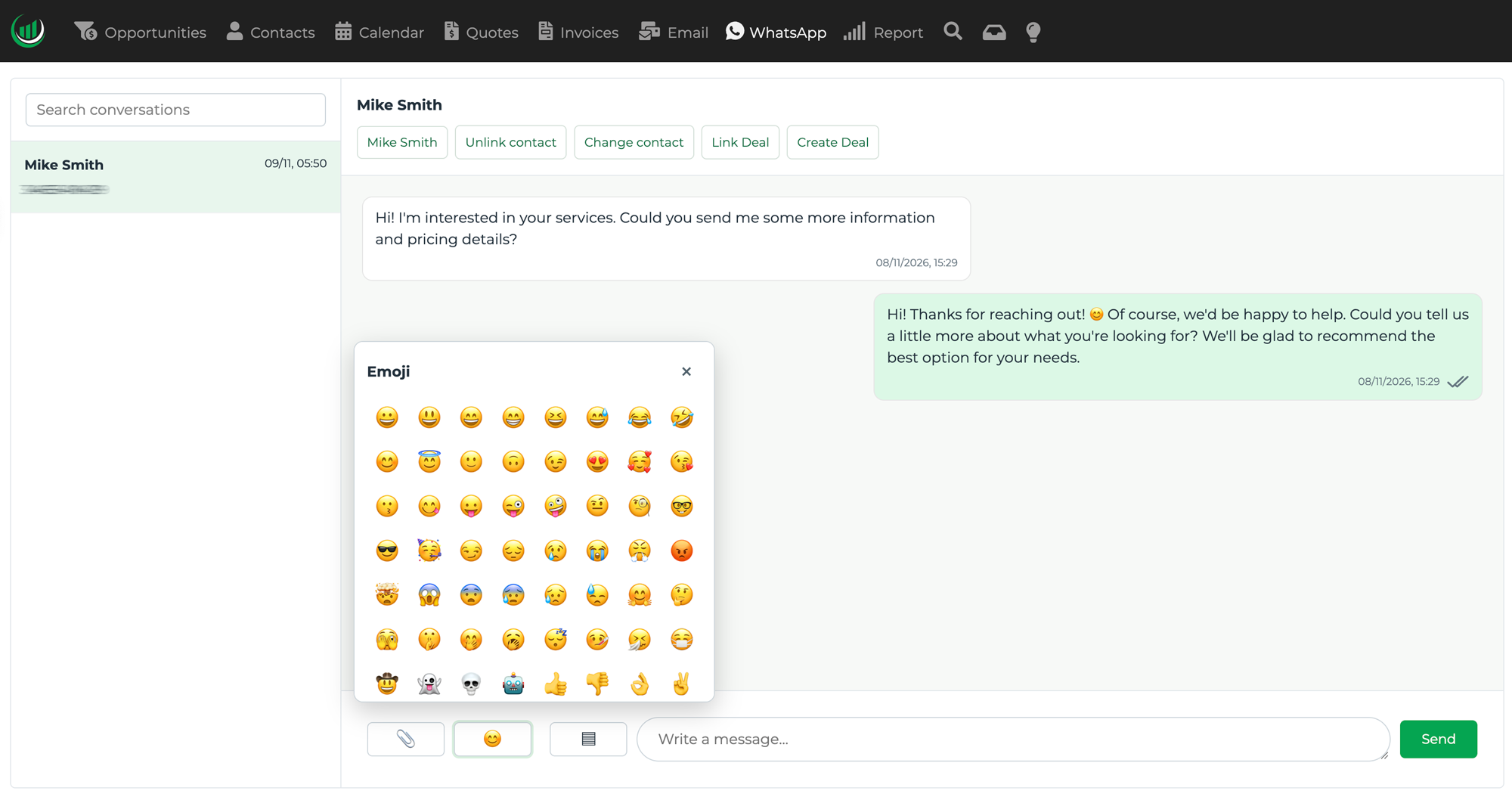
Available in English, Spanish, Portuguese, French and Italian.
Bring WhatsApp into your workflow
WhatsApp is where many business conversations happen. Keep your customer communications connected to your sales process with Onpipeline.
Conversation history
Keep your WhatsApp conversations organized in your CRM, with message history accessible to authorized users.
Connected to your Pipeline
Link WhatsApp conversations to CRM contacts and deals, keeping customer communications connected to your sales opportunities.
Send sales quotes
Share PDF quotations using approved WhatsApp message templates, even outside the 24-hour messaging window.
Appointment reminders
Send appointment reminders and important updates through WhatsApp using supported message templates.
Reply from your CRM
Send WhatsApp messages, share attachments, and manage customer conversations directly from Onpipeline, all in one place.
Keep using WhatsApp
Continue chatting from the WhatsApp Business app on your phone while using Onpipeline with supported Coexistence synchronization.
Why Choose Onpipeline for WhatsApp CRM?
Get WhatsApp built directly into your CRM. No separate messaging platform, no extra subscriptions, and no disconnected sales conversations.
No Third-Party App
Why pay for another platform just to use WhatsApp with your CRM? Onpipeline connects directly to Meta's Cloud API, without requiring separate subscriptions to messaging services such as TimelinesAI, Helpwise, or Callbell.
Real WhatsApp Client
Not just message logs or external integrations. Read conversations, send messages, share attachments, and manage customer communication directly inside Onpipeline. No separate messaging dashboard required.
WhatsApp with Coexistence
Your number. Your conversations. With supported WhatsApp Coexistence, your team can continue using the official WhatsApp Business app while keeping conversations synchronized with Onpipeline.
Fewer Tools. Less Complexity.
Simplify your sales technology stack. Avoid managing multiple messaging platforms, disconnected inboxes, and additional integrations. Your sales team can work with WhatsApp and customer information in one CRM.
Frequently Asked Questions
Can I use WhatsApp Business and Onpipeline at the same time?
Yes. With WhatsApp Coexistence, you can continue using the official WhatsApp Business app on your phone while managing conversations in Onpipeline. Supported messages are synchronized between the two platforms, so you can work from either interface without changing your usual workflow.
Do I need a new phone number to connect WhatsApp to Onpipeline?
No. If your existing WhatsApp Business number is eligible for Coexistence, you can connect it to Onpipeline without changing your number or disconnecting the WhatsApp Business app.
Can I send and receive WhatsApp messages directly from Onpipeline?
Yes. Onpipeline includes a built-in WhatsApp client where you can read conversations, send replies, share attachments, and manage customer communication without opening a separate messaging platform.
Does Onpipeline automatically save WhatsApp conversations?
Yes. Onpipeline stores supported incoming and outgoing WhatsApp messages and associates conversations with CRM contacts using their phone numbers. Conversations can also be linked to sales opportunities, keeping customer communication connected to your sales pipeline.
Can I send WhatsApp messages after the 24-hour window?
Yes, using Meta-approved WhatsApp message templates. Regular free-form messages sent through the Cloud API are generally limited to the 24-hour customer service window following the customer’s last message. Once that window closes, approved templates are required.
Is Onpipeline's WhatsApp integration based on the official Meta API?
Yes. Onpipeline uses the official WhatsApp Business Cloud API provided by Meta, including support for WhatsApp Coexistence on eligible accounts.