
 Free quiz to know your sales aptitude
 Sales Pipeline Calculator
If you search for CRM workflow automation, you’ll often find overcomplicated explanations filled with technical jargon and advanced integrations.
But in reality, most sales teams don’t need complexity, they need consistency, speed, and reliability in their sales processes.
That’s where practical, easy-to-configure workflows make the difference.
What is workflow automation
At its core, CRM workflow automation is simple:
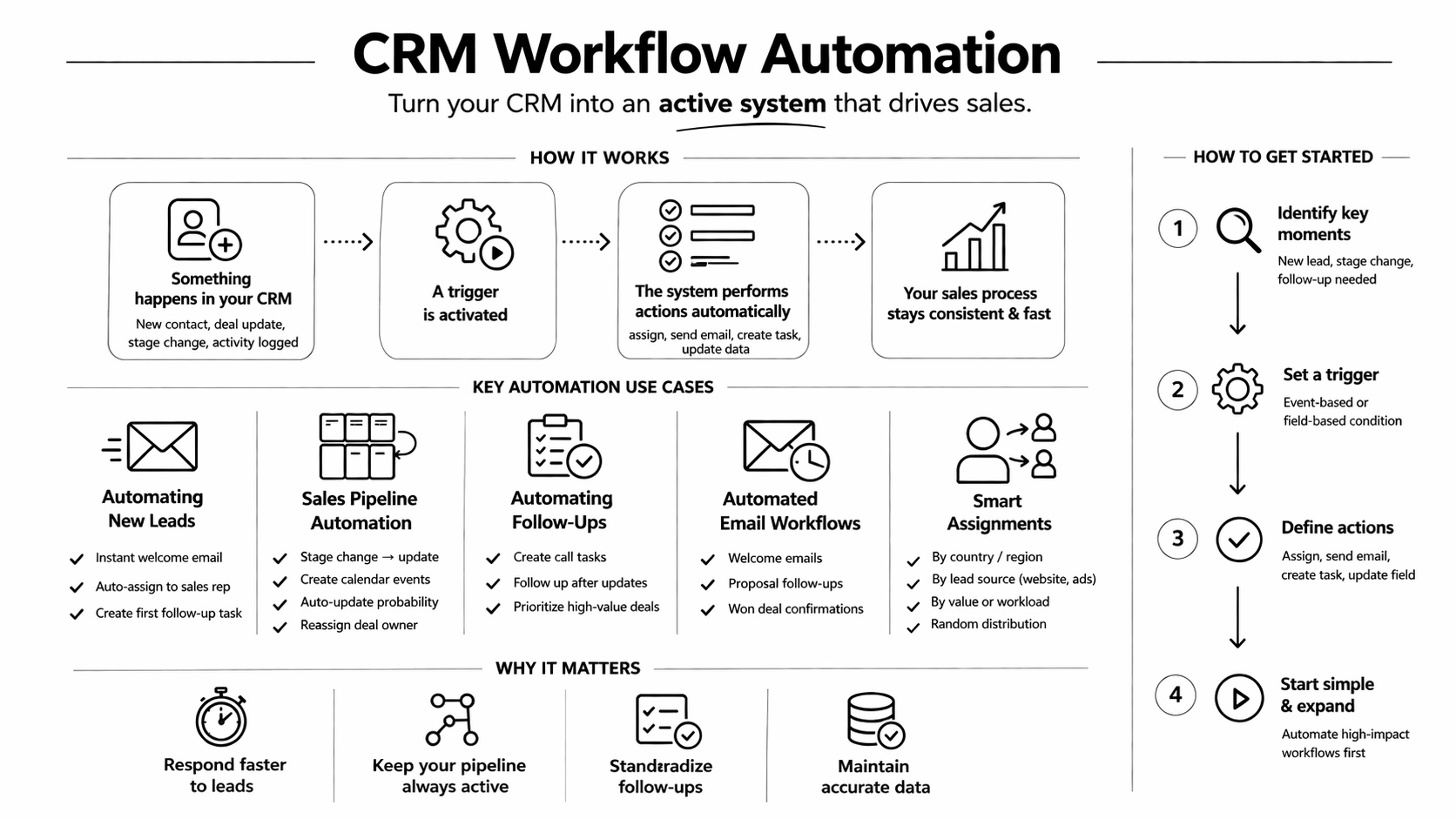
When something happens in your CRM → the system performs an action.
Deal created → Country = UK → Assign to UK sales rep + send email
This turns your CRM from a passive database into an active system that drives your sales process.
These “somethings” are real events tied to your daily sales activity:
- a new contact is created
- a deal is updated
- a stage in the sales pipeline changes
- an activity is logged
Instead of relying on manual work, automation tools ensure that tasks, emails, assignments, and updates happen automatically. This turns your CRM into an active system. And that’s the foundation of effective sales automation.
Field-based triggers
In addition to event-based triggers, workflows can also be triggered by field values. This means an automation can start not only when something happens, but when specific data meets certain conditions.
For example:
- when the deal value exceeds a certain threshold
- when a contact has a specific source (e.g. “website” or “ads”)
- when a custom field is updated to a particular value
In these cases, the trigger combines an event (such as a record update) with a data condition. From a practical standpoint, this allows you to build much more targeted workflows. Instead of applying the same automation to every record, you can trigger actions only when a lead or opportunity meets specific criteria.
Why CRM automation is essential
Sales processes today are more complex than ever. Leads come from multiple channels, deals involve multiple touchpoints, and timing plays a critical role in closing opportunities.
Without automation, teams often struggle with:
- delayed responses to new leads
- inconsistent follow-ups
- incomplete or outdated pipeline data
- manual task management
By automating key steps, you create a structured process that runs consistently, regardless of workload or team size.
Automating new leads
One of the most impactful applications is handling new leads.
When a contact is created in your CRM, timing is critical. A delayed response can significantly reduce conversion chances.
You can build a simple but powerful workflow:
As soon as a contact is created, the system automatically sends an email, assigns the deal to a sales representative, and creates a follow-up task.
This is a perfect example of lead management automation in CRM – a process that ensures no opportunity is missed.
From a configuration standpoint, this involves selecting a “contact created” or “deal created” trigger and linking it to actions such as sending emails, assigning ownership, and creating tasks.
The outcome is a faster, more reliable sales process from the very first interaction.
Sales pipeline automation
A well-managed pipeline is essential for accurate forecasting and effective sales management. However, many pipelines become unreliable because they depend on manual updates. With sales pipeline automation, you can ensure that your deals evolve automatically based on real actions.
For example, when a deal is updated or moved to a new stage, Onpipeline can trigger workflows that create tasks, assign ownership, or initiate the next step in the process.
This transforms your pipeline into a structured system where each stage is connected to predefined actions.
Real examples of pipeline automation
Deal moved to a specific stage → Calendar event created
When a deal reaches a stage such as Negotiation, the CRM can automatically create a reminder or event in the calendar so the sales rep is prompted to take the next action.
Deal created → First follow-up activity
As soon as a new deal is created, the system can automatically create an activity for the deal owner’s calendar, helping ensure the prospect is contacted quickly.
Deal stage changed → Probability updated
As a deal moves through the pipeline, the CRM can automatically update its probability.
Deal reaches a stage → Deal owner changed
When a deal enters a specific stage or pipeline, ownership can be transferred automatically under defined conditions.
Automating follow-ups
Follow-ups are one of the most critical elements of any sales strategy, and one of the most difficult to execute consistently.
Instead of relying on memory, you can define workflows that automatically create tasks whenever certain events occur.
For instance, after a deal update or activity completion, the CRM can generate a follow-up task assigned to the appropriate user.
This approach ensures that every opportunity is nurtured properly, improving both efficiency and conversion rates. It’s a clear example of how automated workflows in CRM can directly impact revenue.
Real examples of automated follow-ups
New deal created → Call task for the deal owner
As soon as a new deal enters the CRM, the system automatically creates a task in the deal owner’s calendar to contact the prospect.
Deal updated → Follow-up call task
When a deal is moved to a new stage (e.g. “proposal sent”), the CRM automatically creates a task to follow up with the prospect after a few days.
High-value deal → Priority follow-up
When a deal exceeds a certain value, a follow-up task is automatically created.
Automated email workflows
Communication timing plays a key role in customer engagement. With email automation, you can send messages automatically based on specific events.
By linking triggers to email templates, you ensure that your communication is always aligned with your sales activity. This improves responsiveness while maintaining consistency.
Real examples of automated email workflows
Instead of generic campaigns, these emails are triggered by real actions:
New contact created → Welcome email
As soon as a new contact enters your CRM, a welcome email is automatically sent to introduce your company and set expectations.
Deal marked as “Won” → Confirmation email
When a deal is closed, the system sends a confirmation or onboarding email, ensuring a smooth transition to the next phase.
Deal moved to “Proposal sent” → Follow-up email
As soon as a deal reaches this stage, an email can be triggered with additional details, documents, or next steps.
Automating assignments
As your CRM grows, managing data manually becomes inefficient and error-prone.
This includes assigning leads/deals to specific users.
Assignments don’t have to be manual or static. They can be driven by logic. You can assign deals based on specific field values, for example:
- assign deals to a sales rep based on country or region
- route leads based on source (e.g. website, ads, referrals)
- assign high-value deals to senior sales representatives
At the same time, you can also use random assignment.
For example:
- assign new deals randomly among team members
- distribute leads based on current workload
- ensure equal opportunity and avoid overloading specific users
These automations ensure that your CRM data remains accurate and organized.
How to get started with automation
One of the advantages of using Onpipeline CRM is that automation doesn’t require a complex setup.
You can start by identifying key moments in your sales process:
- when a new lead enters the system
- when a deal changes stage
- when a follow-up is needed
From there, you define a trigger and connect it to one or more actions.
The key is to start simple and expand gradually. Even a few well-designed workflows can significantly improve your sales efficiency.
Common mistakes to avoid
While workflow automation is powerful, it’s important to use it strategically.
One common mistake is trying to automate everything at once.
Instead, focus on high-impact processes first.
Another mistake is creating workflows without clear logic. Automation should reflect your actual sales process, not complicate it.
Finally, it’s important to review and optimize workflows over time, ensuring they continue to support your team effectively.
CRM workflow automation is not about replacing human interaction. It’s about supporting it with structure, timing, and consistency. By implementing automated workflows in CRM, you can:
- respond faster to leads
- keep your sales pipeline active
- standardize follow-ups
- maintain accurate data
With Onpipeline, automation becomes a practical part of your daily workflow, not a complex system to manage. And that’s what turns a CRM into a real sales engine.