
 Test gratuito para conocer tu aptitud para las ventas
 Calculadora del embudo de ventas
Un cliente potencial envía un formulario de contacto a las 10:14.
El formulario llega a una bandeja de entrada compartida. Alguien lo ve a las 10:47, pero asume que otro colega se encargará de él. A las 11:20, el director de ventas reenvía el mensaje a un representante. El representante está en una reunión y responde después de almorzar.
Técnicamente no ha salido nada mal. El mensaje fue entregado, el equipo estuvo trabajando y el responsable terminó recibiendo una respuesta.

El problema es que no había un proceso de respuesta a clientes potenciales.
El tiempo de respuesta a los clientes potenciales suele tratarse como un asunto de disciplina individual. En la práctica, las demoras suelen ser causadas por una propiedad poco clara, enrutamiento manual, información incompleta y herramientas que no comparten datos.
Un sistema de velocidad de respuesta aborda estos problemas definiendo lo que sucede desde el momento en que llega una consulta hasta el momento en que un representante de ventas establece contacto.
¿Qué es el tiempo de respuesta de los clientes potenciales?
El tiempo de respuesta a los clientes potenciales es el período comprendido entre el momento en que un cliente potencial expresa interés y el momento en que un miembro del equipo de ventas realiza el primer contacto significativo.
El punto de partida puede ser:
- el envío de un formulario de un sitio web;
- una solicitud de demostración;
- una consulta de precios;
- un correo electrónico entrante;
- una solicitud de devolución de llamada;
- un cliente potencial proporcionado por un socio;
- una consulta recibida a través de una plataforma publicitaria;
- una solicitud de cita.
El punto final debe ser un acción de ventas genuina. Esto podría ser una llamada telefónica, un correo electrónico personal relevante o un mensaje directo que responda a la consulta. Una confirmación automatizada como “Hemos recibido su solicitud” es útil, pero normalmente no es una respuesta de ventas humana.
Un cálculo básico es:
Tiempo de respuesta al cliente potencial = hora de la primera respuesta de ventas − hora en que se recibió el cliente potencial
Por ejemplo, si un cliente potencial envía una solicitud de demostración a las 09:05 y un representante de ventas llama a las 09:17, el tiempo de respuesta del cliente potencial es de 12 minutos.
¿Qué significa "speed to lead"?
La velocidad de respuesta es el proceso de reducir el tiempo entre que un cliente potencial muestra interés y el primer contacto de ventas.
No significa llamar a cada persona en treinta segundos.
Un proceso útil de velocidad de respuesta al cliente potencial responde a cuatro preguntas:
- ¿Qué consultas requieren una respuesta rápida?
- ¿De quién es cada nuevo cliente potencial?
- ¿Qué debe hacer primero el propietario?
- ¿Qué pasa cuando el propietario no responde?
El objetivo no es la velocidad en sí misma. Un mensaje apresurado e irrelevante difícilmente ayudará. El objetivo es contactar al cliente potencial mientras la consulta aún está vigente, con suficiente información para continuar la conversación.
¿Qué tan rápido se debe responder a un cliente potencial?
No existe un objetivo único de tiempo de respuesta para todos los negocios.
Una persona que solicita una demostración de producto tiene un nivel de intención diferente al de alguien que descarga una guía general. Una consulta médica puede requerir un proceso diferente al de una solicitud de precios al por mayor. El horario laboral, los territorios y la capacidad de ventas también influyen en lo que resulta realista.
El punto de referencia de cinco minutos, que se cita a menudo, proviene de investigaciones anteriores sobre la respuesta a clientes potenciales. Dicha investigación encontró una disminución marcada en las tasas de contacto y calificación a medida que aumentaban los tiempos de respuesta. Sigue siendo una referencia útil para las consultas entrantes de alta intención, pero no debe tratarse como una regla universal para cada envío de formularios.
Los siguientes objetivos pueden utilizarse como punto de partida:
| Tipo de cliente potencial | Objetivo de primera respuesta sugerido |
|---|---|
| Solicitud de demostración | 5 a 15 minutos durante el horario laboral |
| Solicitud de precio o cotización | 5–15 minutos |
| Solicitud de llamada | 5 a 10 minutos |
| Formulario de contacto de ventas | En 30 minutos |
| Formulario de contacto general | En el plazo de una hora hábil |
| Cliente potencial de socio o referencia | En el plazo de una hora hábil |
| Cliente potencial de evento o feria comercial | Mismo día hábil |
| Descarga de contenido | Mismo día o mediante un proceso de nutrición acordado |
| Consulta fuera de horario | Acuse de recibo inmediato y respuesta en la siguiente ventana de servicio indicada |
Estos son objetivos operativos, no promesas que cada empresa deba adoptar.
Un equipo que vende maquinaria compleja puede necesitar tiempo para identificar al representante técnico correcto. Una empresa de servicios local puede necesitar responder casi de inmediato porque los clientes suelen ponerse en contacto con varios proveedores a la vez.
El público objetivo adecuado es aquel que refleja la intención de compra y se puede monitorear de manera constante.
Por qué el tiempo de respuesta a los clientes potenciales se vuelve lento
La respuesta lenta no siempre se debe a que los representantes de ventas ignoren a los clientes potenciales. Con más frecuencia, el tiempo se pierde entre sistemas y equipos.
Los clientes potenciales llegan a diferentes lugares
Los formularios de sitios web, las cuentas de correo electrónico, las plataformas publicitarias, las hojas de cálculo y los portales de socios pueden generar consultas.
Cuando cada fuente tiene un proceso de notificación independiente, los vendedores deben consultar varios lugares para encontrar nuevo trabajo. Algunos clientes potenciales se gestionan dos veces. Otros se pierden.
Nadie lleva la iniciativa/negocio
Una notificación enviada a cinco personas no significa que una de ellas sea responsable.
Los buzones compartidos suelen crear un vacío de responsabilidad. Cada destinatario puede ver la consulta, pero ninguna persona en concreto es responsable de responder.
La asignación requiere un gerente
Si cada cliente potencial debe leerse y reenviarse manualmente, el tiempo de respuesta depende de la disponibilidad del gerente.
Esto se convierte en un problema mayor cuando los clientes potenciales deben dividirse por territorio, idioma, producto, industria o equipo de ventas.
El formulario no recopila información útil
Un representante de ventas puede recibir solo un nombre y una dirección de correo electrónico. Antes de responder, necesita encontrar la empresa, identificar el producto de interés y determinar si el cliente potencial pertenece a su territorio.
Un formulario más corto puede aumentar los envíos, pero recopilar muy poca información puede ralentizar el siguiente paso.
El equipo cuenta los mensajes automatizados como respuestas
Un correo electrónico de confirmación confirma que el formulario funcionó. No responde a una pregunta sobre precios, no organiza una llamada ni ayuda al cliente potencial a elegir un producto.
Cuando las confirmaciones automatizadas se cuentan como respuestas de ventas, los informes pueden mostrar un tiempo de respuesta rápido a pesar de que nadie se ha puesto en contacto con el cliente potencial.
No hay ningún plan para las tardes y los fines de semana
Una empresa puede tener un proceso claro durante el horario de oficina y ningún proceso después de las 17:00.
La respuesta no siempre tiene que ser un equipo de ventas disponible las 24 horas. Puede ser un reconocimiento claro, una opción para reservar citas y una indicación honesta de cuándo responderá un representante.
Cómo construir un sistema de velocidad de respuesta a clientes potenciales
Un sistema de velocidad de respuesta ("speed-to-lead") debe ser lo suficientemente simple para que el equipo lo siga y lo suficientemente específico para medirlo.
1. Decide cuándo empieza el reloj de respuesta
Elige un evento que inicie el temporizador.
Para los clientes potenciales del sitio web, normalmente será la marca de tiempo del envío del formulario. Para los clientes potenciales de socios, puede ser el momento en que el registro entra en el CRM. Para las llamadas entrantes, puede ser la hora de la llamada perdida o de la solicitud de devolución de llamada.
Evite iniciar el temporizador solo después de que un representante de ventas haya aceptado el cliente potencial. Eso elimina el retraso de asignación del cálculo, a pesar de que el prospecto aún lo experimentó.
Registre ambas marcas de tiempo cuando sea posible:
- Cliente potencial recibido;
- Propietario asignado.
Esto muestra si los retrasos ocurren durante el enrutamiento o después de la asignación.
2. Separar los clientes potenciales por intención
No todos los clientes potenciales requieren la misma respuesta.
Una clasificación práctica puede incluir:
- Alta intención demostración, consulta, ventas cotización o solicitudes de devolución de llamada;
- Intención media: detailed product questions, partner referrals or event enquiries;
- Low intent: newsletter sign-ups, general downloads or early research activity;
- Operational: support, supplier, employment or unrelated requests.
The category can be determined from the form used, lead source or answers provided by the prospect.
High-intent enquiries should receive the shortest response target. Low-intent leads may enter a planned email sequence until they show further interest.
3. Capture leads in one system
The response process becomes easier when incoming leads enter a common queue.
A CRM can receive data from embedded forms, advertising tools, integrations, APIs and manual entry. The source should remain attached to the record so managers can compare both lead quality and response time by channel.
Onpipeline, for example, can collect leads from its own formularios web, API y external form tools. Incoming records can enter a dedicated “Leads IN” area where the team reviews, validates and checks them for duplicates.
This review layer is useful when lead quality varies or when several partners send data in different formats.
For selected forms, Onpipeline can also create a contact automatically instead of sending the submission through the intermediate review area. This may suit high-intent forms where the team has decided that immediate processing matters.
The choice should depend on the source:
- use review and validation for imported lists or less predictable lead sources;
- use automatic contact or deal creation for controlled, high-intent forms;
- retain duplicate checks in both cases.
4. Collect the information needed for routing
The form should collect enough information to send the lead to the right person.
Useful routing fields may include:
- country or region;
- preferred language;
- product or service;
- company size;
- customer type;
- industry;
- requested appointment;
- existing customer status;
- estimated requirement;
- preferred contact method.
Do not add fields simply because the CRM can store them. Each required field should support qualification, routing or the first conversation.
Onpipeline web forms can use custom and dynamic fields, including fields that appear only after a particular answer. This allows a form to collect relevant routing information-
5. Assign one owner
Every sales-ready lead should have one named owner.
Assignment rules can be based on:
- territory;
- language;
- product;
- industry;
- company size;
- lead source;
- existing account ownership;
- team availability.
When several representatives can handle the same enquiry, round-robin assignment can distribute the work. Capacity-based assignment can take current workloads into account.
Onpipeline can assign imported deals using contact information such as location or industry. It also supports random assignment and weighted round-robin distribution based on open deals. Its workflow automation can create and assign deals according to product interest, location, etc.
The assignment rule should be visible to the team. A system that nobody understands will be questioned whenever a lead reaches the “wrong” person.
6. Create a first-response activity
Assignment alone does not create a next action.
When a lead becomes a deal, the CRM should create a clear first-response activity for the owner. The activity should state:
- what the representative needs to do;
- when it is due;
- which lead or deal it belongs to;
- which response target applies.
Examples include:
- Call new demo request;
- Reply to quotation enquiry;
- Review partner referral;
- Contact website lead;
- Confirm requested appointment.
Onpipeline can automatically create activities when contacts or deals are created or updated. Tasks can be assigned to deal owners or distributed across a team. Activities can then remain connected to the relevant contact.
A specific activity such as “First response” is easier to report on than a general task called “Follow up”.
7. Acknowledge the enquiry
An automated acknowledgement serves three purposes:
- it confirms that the request was submitted;
- it explains what will happen next;
- it gives the prospect an alternative action.
- A useful acknowledgement might say:
Thank you for requesting a product demonstration. A member of our sales team will contact you during the next 30 minutes. You can also choose a suitable meeting time using the link below.
This is more useful than:
Thank you for your interest. We will get back to you as soon as possible.
The message should not claim that a representative has reviewed the enquiry when this has not happened.
Onpipeline workflows can send an email when a contact or deal is created or updated. The platform also supports reusable email templates, SMS notifications and appointment booking, allowing the acknowledgement to include a direct scheduling option.
8. Give representatives a usable first-response playbook
Automation should bring the lead to the salesperson. It should not replace the conversation.
The representative needs a small number of response patterns for common enquiries.
Demo request:
- refer to the requested product or service;
- ask one relevant qualification question;
- suggest a specific call or meeting;
- include the booking option.
Pricing request:
- acknowledge the requested product;
- explain which information is needed to provide an accurate price;
- ask for the missing detail;
- propose a short call when the quotation is not straightforward.
Callback request:
- call the requested number;
- send a brief email if the call is unanswered;
- provide a direct way to choose another time.
Existing customer enquiry:
- recognise the existing relationship;
- check the account history before responding;
- route service matters to the correct team without making the customer repeat the request.
Templates can save time, but the first line should reflect what the person actually asked.
A speed-to-lead workflow in Onpipeline
A practical workflow could look like this.
10:14 → The form is submitted
A prospect completes a demo form on the company website.
The form records:
- contact details;
- company;
- country;
- product interest;
- preferred meeting time;
- lead source.
The data enters Onpipeline through a web form or API.
10:15 → The lead is processed
Depending on the source and the company’s rules, the record either enters Leads IN for review or creates a contact automatically.
After qualification, a deal is created in the correct pipeline.
10:15 → The deal receives an owner
The deal is assigned according to territory, product interest or workload.
A first-response activity is created for the owner.
10:16 → The prospect receives an acknowledgement
A workflow sends an email confirming the request and explaining the next step.
The email may include a link to book a meeting.
10:19 → The representative makes contact
The representative opens the deal, reviews the submitted details and calls or emails the prospect.
Onpipeline can connect emails to the relevant contact and deal, log communication history and support calls or SMS.
10:22 → The activity is completed
The representative marks the first-response activity as completed and records the outcome:
- connected;
- voicemail;
- email sent;
- meeting booked;
- not qualified;
- further information required.
The next activity is then scheduled.
This process does not require the representative to search for the lead, decide who owns it or recreate the submitted information.
How to measure lead response time
An average response time is useful, but it is not enough.
Suppose ten leads receive a response in five minutes and one waits for two days. The average may still look acceptable, while the delayed lead reveals a problem in the process.
Track several indicators together.
Median lead response time
The median shows the middle response time and is less affected by a small number of extreme cases.
SLA compliance
This is the percentage of leads contacted within the agreed target.
Por ejemplo:
Leads contacted within 30 minutes ÷ total high-intent leads × 100
Time to assignment
Measure the period between lead creation and owner assignment.
A high time-to-assignment result usually points to routing or review delays rather than representative performance.
Time from assignment to first action
This measures how quickly the owner acts after receiving the lead.
Uncontacted lead rate
Track the percentage of sales-ready leads with no completed call, email or other response activity.
A fast average can hide leads that received no response at all.
Response time by source
Compare website forms, advertising campaigns, partners, events and manual imports.
One source may be entering the CRM later than the others, or may require more manual validation.
Response time by team and working period
Review performance by:
- team;
- territory;
- day of the week;
- working hours versus out-of-hours;
- product line;
- lead type.
Onpipeline reports can show deals and activities over time and provide sales metrics such as sales velocity and pipeline stage duration. Campos personalizados y activity types can also be used to structure the information.
Before claiming that a CRM provides a native lead-response report, check exactly how the metric is calculated. A custom report based on clearly defined timestamps may be more reliable than a default figure with an unclear starting point.
What should happen when the first attempt fails?
Speed to lead concerns the first response, but one fast unanswered call is not a complete follow-up process.
Define the next steps in advance.
A simple sequence might be:
| Time | Acción |
|---|---|
| First 15 minutes | Call and send a relevant email if unanswered |
| Later the same day | Second call or alternative channel |
| Next business day | Follow-up with a specific question or resource |
| Following days | Planned sequence based on lead type |
| End of sequence | Close, nurture or disqualify with a recorded reason |
The sequence should reflect the value and intent of the lead. A demo request may justify several direct attempts. A general content download may be better handled through a lower-pressure nurture process.
Each attempt should be recorded. This prevents two representatives from sending the same message and gives the next person enough context to continue the conversation.
Common speed-to-lead mistakes
1. Treating every lead as urgent
When every submission has the highest priority, representatives stop trusting the alerts.
Reserve the shortest response targets for forms and sources associated with clear buying intent.
2. Automating the message but not the ownership
An immediate email does not help the sales team when nobody is assigned to continue the conversation.
Automate routing and the next activity, not only the acknowledgement.
3. Using a shared inbox as a queue
A shared inbox can support communication, but it should not be the only ownership system.
The CRM record should show who is responsible.
4. Measuring only successful conversations
Lead response time should normally use the first genuine attempt, not the moment the prospect answers.
The salesperson controls the attempt. They do not control whether the prospect is available.
Track contact rate separately.
5. Ignoring duplicate records
Duplicate leads can create two owners, repeated calls and conflicting messages.
Duplicate detection should happen early, but it should not leave urgent enquiries waiting indefinitely for manual review.
6. Optimising speed at the expense of relevance
A quick response that ignores the form details makes the process feel automated even when a person sends it.
Representatives should be able to see the lead source, answers and previous contact history before responding.
7. Setting an SLA without checking capacity
A five-minute target is meaningless when one representative receives thirty leads during the same period.
Review lead volume, working hours and team capacity before setting the target. Routing rules should account for workload rather than repeatedly assigning leads to the same person.
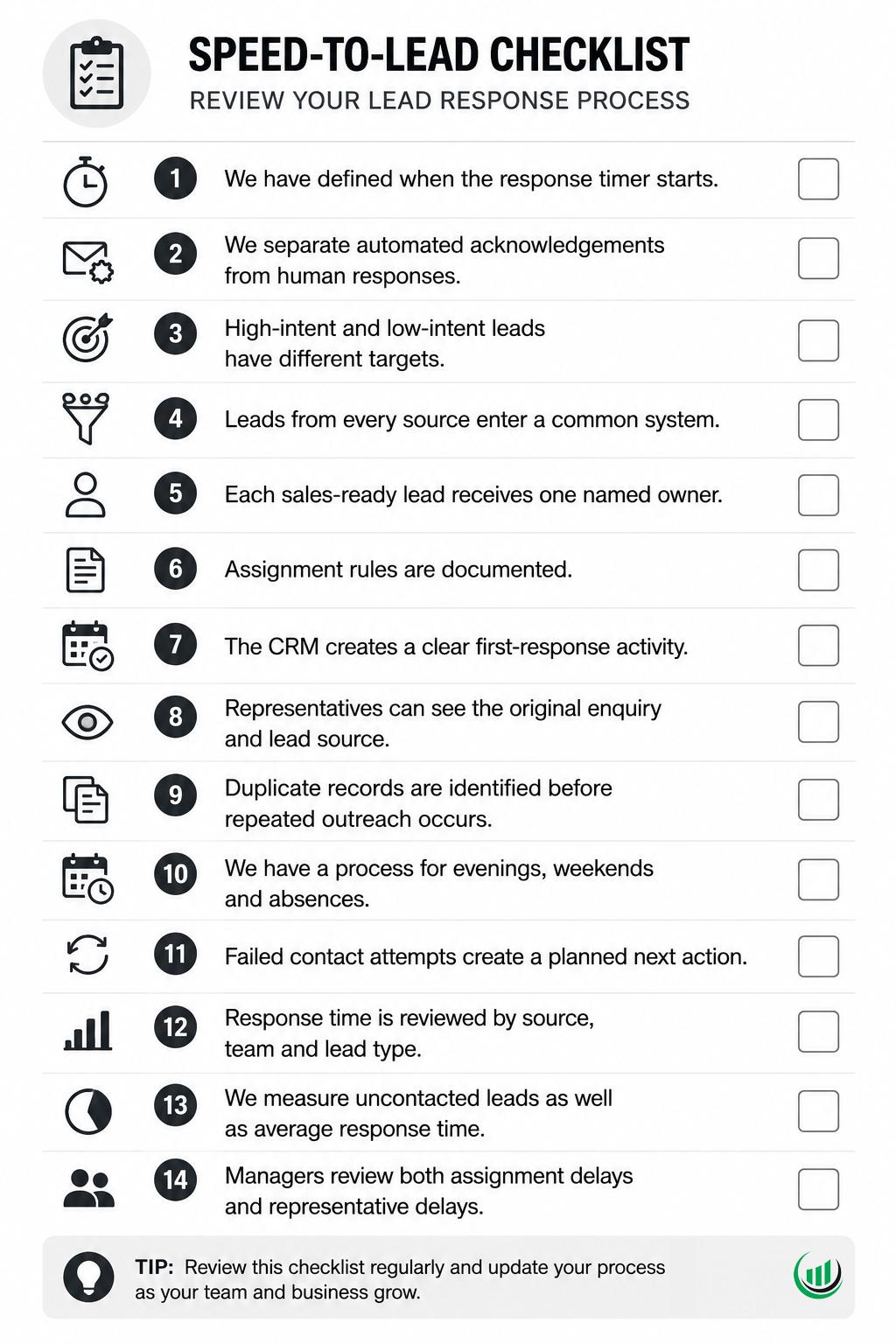
Lead response time checklist
Use this checklist to review your current process.
Build a process before asking people to work faster
Reducing lead response time does not begin with telling representatives to check their inbox more often.
It begins with a defined process:
- capture the lead;
- identify its intent;
- check the data;
- assign one owner;
- create the next action;
- acknowledge the request;
- make contact;
- record the outcome;
- measure the delay.
Onpipeline connects lead capture, deal assignment, activities, workflow automation and customer communications in the same CRM. The result is not simply a faster first email. It is a clearer handoff from marketing activity to sales responsibility.