
 Test gratuit pour connaître votre aptitude à la vente
 Calculateur de pipeline de ventes
A prospect submits a contact form at 10:14.
The form reaches a shared inbox. Someone sees it at 10:47 but assumes another colleague will handle it. At 11:20, the sales manager forwards the message to a representative. The representative is in a meeting and replies after lunch.
Nothing has technically gone wrong. The message was delivered, the team was working and the lead eventually received a response.

The problem is that there was no lead response process.
Lead response time is often treated as a matter of individual discipline. In practice, delays are usually caused by unclear ownership, manual routing, incomplete information and tools that do not share data.
A speed-to-lead system addresses these issues by defining what happens from the moment an enquiry arrives to the moment a sales representative makes contact.
What is lead response time?
Lead response time is the period between a prospect expressing interest and a member of the sales team making the first meaningful contact.
The starting point may be:
- a website form submission;
- a demo request;
- a pricing enquiry;
- an incoming email;
- a callback request;
- a lead supplied by a partner;
- an enquiry received through an advertising platform;
- an appointment request.
The end point should be a genuine sales action. This might be a phone call, a relevant personal email or a direct message that addresses the enquiry. An automated confirmation such as “We received your request” is useful, but it is not normally a human sales response.
A basic calculation is:
Lead response time = time of first sales response − time the lead was received
For example, if a prospect submits a demo request at 09:05 and a sales representative calls at 09:17, the lead response time is 12 minutes.
What does speed to lead mean?
Speed to lead is the process of reducing the time between a lead showing interest and the first sales contact.
It does not mean calling every person within thirty seconds.
A useful speed-to-lead process answers four questions:
- Which enquiries require a rapid response
- Who owns each new lead?
- What should the owner do first?
- What happens when the owner does not respond?
The objective is not speed on its own. A rushed and irrelevant message is unlikely to help. The objective is to contact the prospect while the enquiry is still current, with enough information to continue the conversation.
How fast should you respond to a lead?
There is no single response-time target for every business.
A person requesting a product demonstration has a different level of intent from someone downloading a general guide. A medical enquiry may require a different process from a wholesale pricing request. Working hours, territories and sales capacity also affect what is realistic.
The often-quoted five-minute benchmark comes from older lead-response research. That research found a marked decline in contact and qualification rates as response times increased. It remains a useful reference for high-intent inbound enquiries, but it should not be treated as a universal rule for every form submission.
The following targets can be used as a starting point:
| Lead type | Suggested first-response target |
|---|---|
| Demo request | 5–15 minutes during working hours |
| Pricing or quotation request | 5–15 minutes |
| Callback request | 5–10 minutes |
| Contact-sales form | Within 30 minutes |
| General contact form | Within one business hour |
| Partner or referral lead | Within one business hour |
| Event or trade-show lead | Same business day |
| Content download | Same day or through an agreed nurture process |
| Out-of-hours enquiry | Immediate acknowledgement and response in the next stated service window |
These are operating targets, not promises that every company must adopt.
A team selling complex machinery may need time to identify the correct technical representative. A local service company may need to respond almost immediately because customers often contact several providers at once.
The right target is one that reflects buying intent and can be monitored consistently.
Why lead response time becomes slow
Slow response is not always caused by sales representatives ignoring leads. More often, time is lost between systems and teams.
Leads arrive in different places
Website forms, email accounts, advertising platforms, spreadsheets and partner portals may all produce enquiries.
When each source has a separate notification process, salespeople must check several places to find new work. Some leads are handled twice. Others are missed.
Nobody owns the lead/deal
A notification sent to five people does not mean that one of them is responsible.
Shared inboxes often create an ownership gap. Each recipient. Each recipient can see the enquiry, but no named person is accountable for responding.
Assignment requires a manager
If every lead must be read and forwarded manually, response time depends on the manager’s availability.
This becomes a larger problem when leads must be divided by territory, language, product, industry or sales team.
The form does not collect useful information
A sales representative may receive only a name and email address. Before responding, they need to find the company, identify the product of interest and determine whether the prospect belongs to their territory.
A shorter form can increase submissions, but collecting too little information can slow down the next step.
The team counts automated messages as responses
An acknowledgement email confirms that the form worked. It does not answer a pricing question, arrange a call or help the prospect choose a product.
When automated acknowledgements are counted as sales responses, reports can show a fast response time even though nobody has contacted the prospect.
There is no plan for evenings and weekends
A company may have a clear process during office hours and no process after 17:00.
The answer does not always need to be a 24-hour sales team. It can be a clear acknowledgement, an appointment-booking option and an honest indication of when a representative will respond.
How to build a speed-to-lead system
A speed-to-lead system should be simple enough for the team to follow and specific enough to measure.
1. Decide when the response clock starts
Choose one event that starts the timer.
For website leads, this will normally be the form-submission timestamp. For partner leads, it may be the moment the record enters the CRM. For incoming calls, it may be the time of the missed call or callback request.
Avoid starting the timer only after a sales representative has accepted the lead. That removes the assignment delay from the calculation, even though the prospect still experienced it.
Record both timestamps when possible:
- lead received;
- owner assigned.
This shows whether delays occur during routing or after assignment.
2. Separate leads by intent
Not every lead requires the same response.
A practical classification may include:
- High intent: demo, consultation, ventes devis or callback requests;
- Medium intent: detailed product questions, partner referrals or event enquiries;
- Low intent: newsletter sign-ups, general downloads or early research activity;
- Operational: support, supplier, employment or unrelated requests.
The category can be determined from the form used, lead source or answers provided by the prospect.
High-intent enquiries should receive the shortest response target. Low-intent leads may enter a planned email sequence until they show further interest.
3. Capture leads in one system
The response process becomes easier when incoming leads enter a common queue.
A CRM can receive data from embedded forms, advertising tools, integrations, APIs and manual entry. The source should remain attached to the record so managers can compare both lead quality and response time by channel.
Onpipeline, for example, can collect leads from its own formulaires Web, API et external form tools. Incoming records can enter a dedicated “Leads IN” area where the team reviews, validates and checks them for duplicates.
This review layer is useful when lead quality varies or when several partners send data in different formats.
For selected forms, Onpipeline can also create a contact automatically instead of sending the submission through the intermediate review area. This may suit high-intent forms where the team has decided that immediate processing matters.
The choice should depend on the source:
- use review and validation for imported lists or less predictable lead sources;
- use automatic contact or deal creation for controlled, high-intent forms;
- retain duplicate checks in both cases.
4. Collect the information needed for routing
The form should collect enough information to send the lead to the right person.
Useful routing fields may include:
- country or region;
- preferred language;
- product or service;
- company size;
- customer type;
- industry;
- requested appointment;
- existing customer status;
- estimated requirement;
- preferred contact method.
Do not add fields simply because the CRM can store them. Each required field should support qualification, routing or the first conversation.
Onpipeline web forms can use custom and dynamic fields, including fields that appear only after a particular answer. This allows a form to collect relevant routing information-
5. Assign one owner
Every sales-ready lead should have one named owner.
Assignment rules can be based on:
- territory;
- language;
- product;
- industry;
- company size;
- lead source;
- existing account ownership;
- team availability.
When several representatives can handle the same enquiry, round-robin assignment can distribute the work. Capacity-based assignment can take current workloads into account.
Onpipeline can assign imported deals using contact information such as location or industry. It also supports random assignment and weighted round-robin distribution based on open deals. Its workflow automation can create and assign deals according to product interest, location, etc.
The assignment rule should be visible to the team. A system that nobody understands will be questioned whenever a lead reaches the “wrong” person.
6. Create a first-response activity
Assignment alone does not create a next action.
When a lead becomes a deal, the CRM should create a clear first-response activity for the owner. The activity should state:
- what the representative needs to do;
- when it is due;
- which lead or deal it belongs to;
- which response target applies.
Examples include:
- Call new demo request;
- Reply to quotation enquiry;
- Review partner referral;
- Contact website lead;
- Confirm requested appointment.
Onpipeline can automatically create activities when contacts or deals are created or updated. Tasks can be assigned to deal owners or distributed across a team. Activities can then remain connected to the relevant contact.
A specific activity such as “First response” is easier to report on than a general task called “Follow up”.
7. Acknowledge the enquiry
An automated acknowledgement serves three purposes:
- it confirms that the request was submitted;
- it explains what will happen next;
- it gives the prospect an alternative action.
- A useful acknowledgement might say:
Thank you for requesting a product demonstration. A member of our sales team will contact you during the next 30 minutes. You can also choose a suitable meeting time using the link below.
This is more useful than:
Thank you for your interest. We will get back to you as soon as possible.
The message should not claim that a representative has reviewed the enquiry when this has not happened.
Onpipeline workflows can send an email when a contact or deal is created or updated. The platform also supports reusable email templates, SMS notifications and appointment booking, allowing the acknowledgement to include a direct scheduling option.
8. Give representatives a usable first-response playbook
Automation should bring the lead to the salesperson. It should not replace the conversation.
The representative needs a small number of response patterns for common enquiries.
Demo request:
- refer to the requested product or service;
- ask one relevant qualification question;
- suggest a specific call or meeting;
- include the booking option.
Pricing request:
- acknowledge the requested product;
- explain which information is needed to provide an accurate price;
- ask for the missing detail;
- propose a short call when the quotation is not straightforward.
Callback request:
- call the requested number;
- send a brief email if the call is unanswered;
- provide a direct way to choose another time.
Existing customer enquiry:
- recognise the existing relationship;
- check the account history before responding;
- route service matters to the correct team without making the customer repeat the request.
Templates can save time, but the first line should reflect what the person actually asked.
A speed-to-lead workflow in Onpipeline
A practical workflow could look like this.
10:14 → The form is submitted
A prospect completes a demo form on the company website.
The form records:
- contact details;
- company;
- country;
- product interest;
- preferred meeting time;
- lead source.
The data enters Onpipeline through a web form or API.
10:15 → The lead is processed
Depending on the source and the company’s rules, the record either enters Leads IN for review or creates a contact automatically.
After qualification, a deal is created in the correct pipeline.
10:15 → The deal receives an owner
The deal is assigned according to territory, product interest or workload.
A first-response activity is created for the owner.
10:16 → The prospect receives an acknowledgement
A workflow sends an email confirming the request and explaining the next step.
The email may include a link to book a meeting.
10:19 → The representative makes contact
The representative opens the deal, reviews the submitted details and calls or emails the prospect.
Onpipeline can connect emails to the relevant contact and deal, log communication history and support calls or SMS.
10:22 → The activity is completed
The representative marks the first-response activity as completed and records the outcome:
- connected;
- voicemail;
- email sent;
- meeting booked;
- not qualified;
- further information required.
The next activity is then scheduled.
This process does not require the representative to search for the lead, decide who owns it or recreate the submitted information.
How to measure lead response time
An average response time is useful, but it is not enough.
Suppose ten leads receive a response in five minutes and one waits for two days. The average may still look acceptable, while the delayed lead reveals a problem in the process.
Track several indicators together.
Median lead response time
The median shows the middle response time and is less affected by a small number of extreme cases.
SLA compliance
This is the percentage of leads contacted within the agreed target.
For example:
Leads contacted within 30 minutes ÷ total high-intent leads × 100
Time to assignment
Measure the period between lead creation and owner assignment.
A high time-to-assignment result usually points to routing or review delays rather than representative performance.
Time from assignment to first action
This measures how quickly the owner acts after receiving the lead.
Uncontacted lead rate
Track the percentage of sales-ready leads with no completed call, email or other response activity.
A fast average can hide leads that received no response at all.
Response time by source
Compare website forms, advertising campaigns, partners, events and manual imports.
One source may be entering the CRM later than the others, or may require more manual validation.
Response time by team and working period
Review performance by:
- team;
- territory;
- day of the week;
- working hours versus out-of-hours;
- product line;
- lead type.
Onpipeline reports can show deals and activities over time and provide sales metrics such as sales velocity and pipeline stage duration. Champs personnalisés et activity types can also be used to structure the information.
Before claiming that a CRM provides a native lead-response report, check exactly how the metric is calculated. A custom report based on clearly defined timestamps may be more reliable than a default figure with an unclear starting point.
What should happen when the first attempt fails?
Speed to lead concerns the first response, but one fast unanswered call is not a complete follow-up process.
Define the next steps in advance.
A simple sequence might be:
| Time | Action |
|---|---|
| First 15 minutes | Call and send a relevant email if unanswered |
| Later the same day | Second call or alternative channel |
| Next business day | Follow-up with a specific question or resource |
| Following days | Planned sequence based on lead type |
| End of sequence | Close, nurture or disqualify with a recorded reason |
The sequence should reflect the value and intent of the lead. A demo request may justify several direct attempts. A general content download may be better handled through a lower-pressure nurture process.
Each attempt should be recorded. This prevents two representatives from sending the same message and gives the next person enough context to continue the conversation.
Common speed-to-lead mistakes
1. Treating every lead as urgent
When every submission has the highest priority, representatives stop trusting the alerts.
Reserve the shortest response targets for forms and sources associated with clear buying intent.
2. Automating the message but not the ownership
An immediate email does not help the sales team when nobody is assigned to continue the conversation.
Automate routing and the next activity, not only the acknowledgement.
3. Using a shared inbox as a queue
A shared inbox can support communication, but it should not be the only ownership system.
The CRM record should show who is responsible.
4. Measuring only successful conversations
Lead response time should normally use the first genuine attempt, not the moment the prospect answers.
The salesperson controls the attempt. They do not control whether the prospect is available.
Track contact rate separately.
5. Ignoring duplicate records
Duplicate leads can create two owners, repeated calls and conflicting messages.
Duplicate detection should happen early, but it should not leave urgent enquiries waiting indefinitely for manual review.
6. Optimising speed at the expense of relevance
A quick response that ignores the form details makes the process feel automated even when a person sends it.
Representatives should be able to see the lead source, answers and previous contact history before responding.
7. Setting an SLA without checking capacity
A five-minute target is meaningless when one representative receives thirty leads during the same period.
Review lead volume, working hours and team capacity before setting the target. Routing rules should account for workload rather than repeatedly assigning leads to the same person.
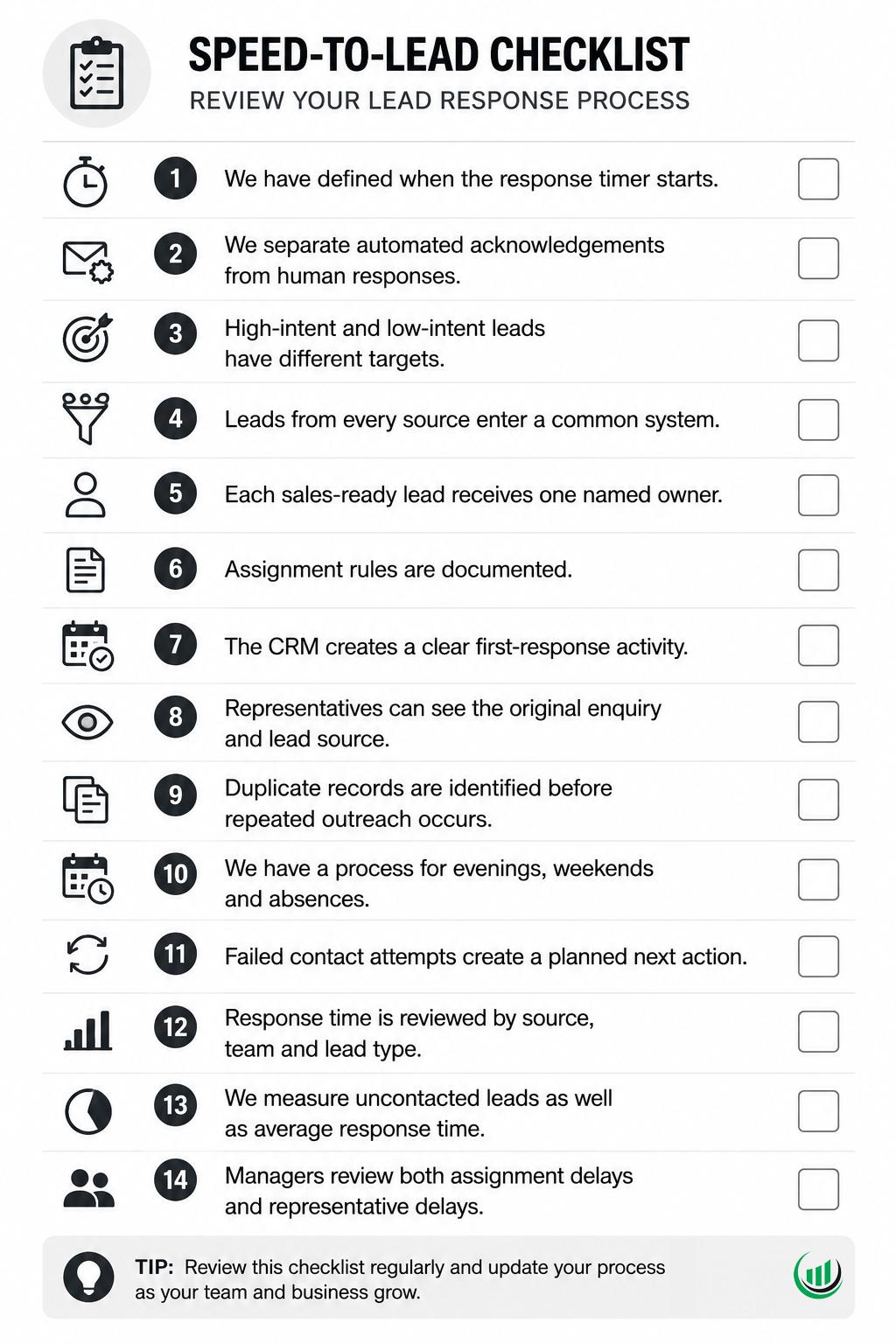
Lead response time checklist
Use this checklist to review your current process.
Build a process before asking people to work faster
Reducing lead response time does not begin with telling representatives to check their inbox more often.
It begins with a defined process:
- capture the lead;
- identify its intent;
- check the data;
- assign one owner;
- create the next action;
- acknowledge the request;
- make contact;
- record the outcome;
- measure the delay.
Onpipeline connects lead capture, deal assignment, activities, workflow automation and customer communications in the same CRM. The result is not simply a faster first email. It is a clearer handoff from marketing activity to sales responsibility.